NMI Refund vs Void: Which One to Use and When
In NMI, use a void when the transaction has not settled yet, and a refund once it has. A void cancels the charge before it is sent for settlement, so no money moves. A refund sends money back to the customer's card after the original payment has already been settled.
The deciding factor is the transaction's status, not how long ago the customer paid. As long as the batch containing the payment has not closed, you can usually void it. After the batch settles, the void option disappears and refund becomes the only choice.
What a void does
When a customer pays by card, the gateway first gets an authorization from the card issuer. The transaction then waits in an open batch until the batch closes and is sent to your processor for settlement. A void removes the transaction from that open batch.
- No funds are transferred. The sale never settles, so it never reaches your deposit.
- The customer is not charged. They may still see a pending authorization for a short time until their bank releases the hold. How long that takes depends on the issuing bank.
- It is all or nothing. A void cancels the whole transaction. If you only want to return part of the amount, you generally need to wait for settlement and issue a partial refund, or void and recharge the correct amount.
What a refund does
A refund is a new transaction that credits the customer's card for some or all of a settled payment. It goes through settlement like any other transaction.
- Money moves twice. You were paid for the original sale, and the refund amount is taken back out of a later deposit, depending on how your processor handles funding.
- Partial refunds are allowed. You can usually refund less than the original amount, and in many cases issue more than one partial refund up to the original total.
- The customer waits. The credit has to settle and then be posted by the customer's bank, so it can take several business days to show on their statement.
Refund vs void at a glance
| Void | Refund | |
|---|---|---|
| When available | Before the batch settles | After the batch settles |
| Money moves | No | Yes, back to the customer |
| Partial amount | No, cancels the whole transaction | Yes, usually |
| What the customer sees | A pending charge that drops off | The original charge plus a credit |
| Processing fees | Often lower or none, depending on your processor | The original sale's fees are often not returned, depending on your processor |
Fee treatment varies a lot. Some processors charge a per-transaction fee on voids or refunds, and some do not return the discount fee on the original sale when you refund. Check your merchant agreement or statement to see how yours works.
How to tell which option you have
Open the transaction in your gateway and look at its status and its available actions. In general:
- Find the transaction by date, amount or the last 4 digits of the card.
- Check the status. A transaction that is approved but still pending settlement can be voided. One marked as settled or complete needs a refund.
- Look at the batch close time. If your gateway settles automatically once a day, anything taken since the last batch closed is usually still voidable.
- Choose the action. Most gateways only show the option that applies, so if you see "Void," the payment has not settled yet.
If you are close to the daily batch cutoff, act quickly. A transaction that was voidable a few minutes ago may have settled by the time you get to it, and then it will need a refund instead.
Doing it in one click, with a record of who did it
Hunting for a transaction and working out its status can be slow in a full gateway portal, especially from a phone at the counter. NMIdash is a hosted dashboard for merchants on the NMI gateway that lets you open any payment, see its details and status, and refund or void it in one click, as long as the API key you connected allows it. Every refund is logged with who did it, when and from where, which helps when several people on your team can issue refunds.
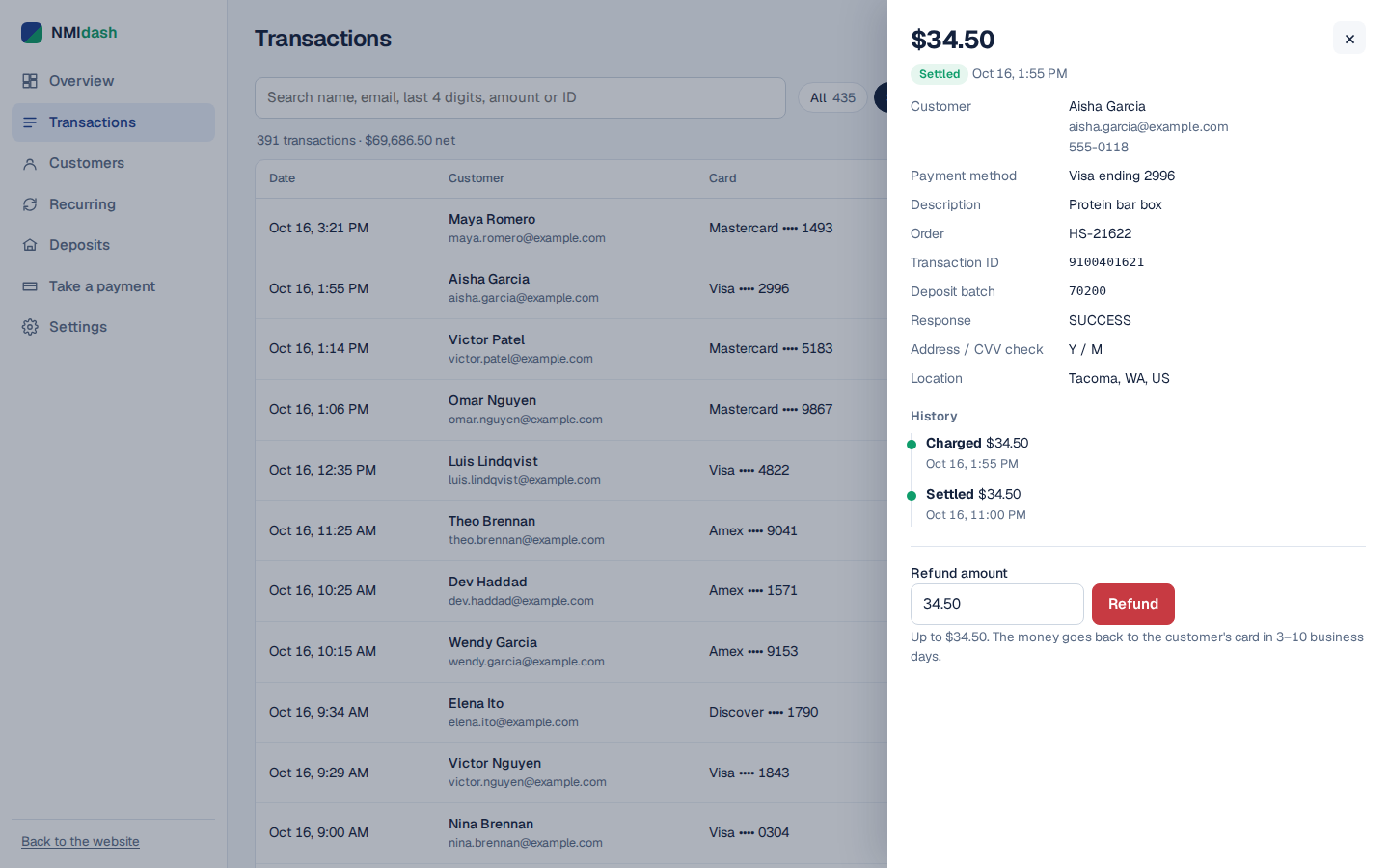
If you would rather not allow refunds from the dashboard at all, you can connect a read-only key or switch refunds off and keep using it for search and reporting. NMIdash is independent software that works with NMI gateways; it is not made or endorsed by NMI.
Common situations and the right choice
You charged the wrong amount a few minutes ago
Void the transaction and run a new one for the correct amount. Because nothing has settled, the customer only ends up with one real charge, though they may briefly see both as pending.
A customer returns an item from last week
The payment has almost certainly settled, so issue a refund for the item's price. If the return is for only part of the order, use a partial refund.
You accidentally ran the card twice
Void the duplicate if it has not settled. If it has, refund it in full. Either way, tell the customer what to expect on their statement so they do not file a dispute.
A customer asks for a refund to a different card
Refunds normally go back to the original card. Sending money to a different card is a common fraud pattern, so many processors discourage or restrict it. Check your processor's policy before doing anything other than a standard refund.
Habits that prevent refund problems
- Limit who can refund. Give refund permission only to staff who need it, and give each person their own login.
- Write a reason. Add a note or order reference so you can explain the refund later.
- Refund rather than let a dispute happen. If a customer is entitled to their money back, a prompt refund is usually cheaper and simpler than handling a chargeback.
- Do not refund a disputed charge without checking. If a chargeback has already been filed, refunding as well can mean the customer is credited twice. Follow your processor's dispute process instead.
Choosing between refund and void in NMI
The rule is simple: void while the transaction is still unsettled, refund once it has settled. Voids are cleaner because no money moves, while refunds are flexible because they allow partial amounts. Check the status, act before the batch closes when you can, and keep a clear record of every refund.
If you want one-click refunds and voids with a full log of who issued them, start a 7-day free trial of NMIdash and connect your NMI gateway.
Frequently asked questions
Can I void a transaction after the batch has settled?
No. Once a transaction settles, the void option is no longer available and you need to issue a refund instead.
How long does a refund take to reach the customer?
It has to settle and then be posted by the customer's bank, which commonly takes several business days. The exact timing depends on the card issuer.
Why does a voided charge still show on the customer's account?
The customer's bank may keep the authorization hold for a while before releasing it. No money was taken, and the hold drops off on the bank's own schedule.