NMI Recurring Billing: Set Up and Manage Subscriptions
NMI recurring billing lets your gateway charge a customer automatically on a schedule, such as every month or every week, without you re-entering their card. You set it up by creating a plan (the amount and schedule) and adding a subscription that links a customer's saved payment details to that plan, either in your gateway portal or through software connected to the gateway.
Recurring billing is often an add-on, so first confirm it is enabled on your account. If you do not see a recurring section in your portal, ask your reseller or NMI to switch it on.
How NMI recurring billing works
There are three pieces to understand:
- Plans define what you charge and how often: for example, a fixed amount every month on a set day, or every set number of days.
- Subscriptions connect one customer to a billing schedule. A subscription can follow a plan or use its own custom amount and schedule.
- Stored payment details let the gateway charge the customer each cycle. The card is saved securely as a token on the gateway side, typically in the Customer Vault, so you never store the card number yourself.
When a billing date arrives, the gateway runs the charge automatically. The payment then appears in your transactions and settles with the rest of that day's batch, like any other sale.
Setting up recurring billing in your gateway
Menu names vary by portal, so look for a section called Recurring or something similar. The general process is:
- Create a plan. Give it a clear name, set the amount, choose how often it bills, and decide whether it runs until cancelled or for a fixed number of payments.
- Get the customer's agreement. Before you store a card for recurring charges, make sure the customer has agreed to the amount, the schedule and how to cancel. Keep a record of that agreement.
- Add the subscription. Enter or select the customer, attach their payment details and choose the plan or a custom schedule. Set the start date.
- Check the first charge. On the first billing date, confirm the payment was approved and the customer received a receipt.
If your website or software creates subscriptions for you, the steps happen behind the scenes through the gateway's API, but the same plan and subscription structure applies.
Plans vs custom subscriptions
| Plan-based subscription | Custom subscription | |
|---|---|---|
| Best for | Many customers on the same price and schedule | One-off arrangements, such as a payment plan |
| Changing the price | Usually means editing or replacing the plan, depending on your gateway | Edit that one subscription |
| Reporting | Easy to group by plan | Harder to group |
A good rule: use plans for your standard offers, and custom subscriptions for exceptions. Check how your gateway handles plan edits before changing a plan that existing subscribers are on.
Managing subscriptions day to day
Updating a card
When a customer gets a new card, update their stored payment details rather than creating a new subscription. That keeps their history and schedule intact.
Pausing or cancelling
Cancel promptly when a customer asks. Charging someone after they cancelled is a common cause of chargebacks. Note the date and how they asked, in case of a later dispute.
Changing the amount
Tell the customer before a price change takes effect. Then update the subscription or move them to a new plan.
Handling failed payments
Recurring charges fail for the same reasons as any card payment: expired cards, insufficient funds, or the issuer declining. Some decline codes specifically tell you to stop recurring charges on that card. Whether and how the gateway retries a failed recurring charge depends on your gateway settings, so check yours, and contact the customer quickly to update their card.
Keeping an eye on subscriptions
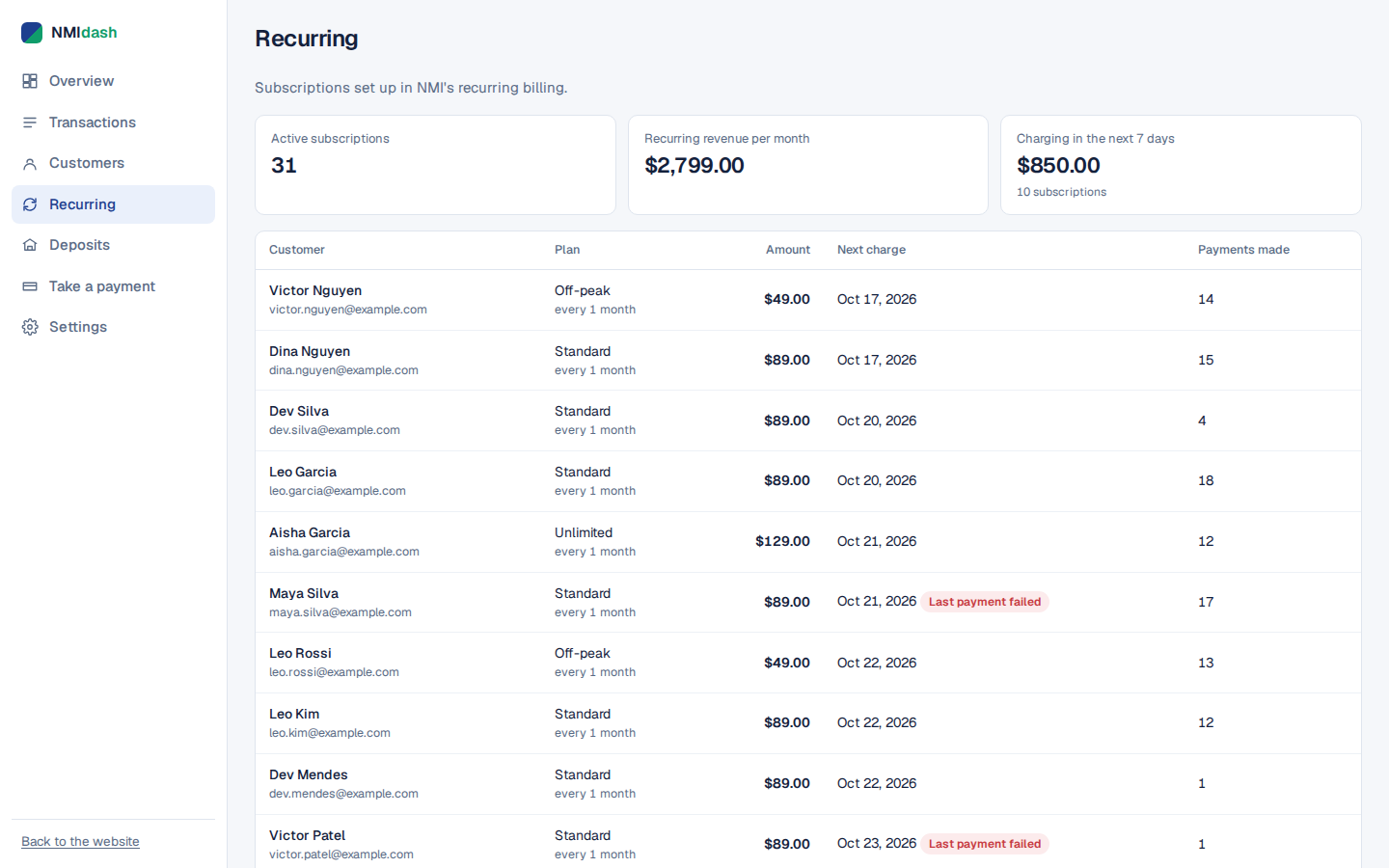
The hardest part of recurring billing is not setup but visibility: knowing who is active, who failed this month and how much recurring revenue is coming in. Gateway portals list subscriptions, but connecting them to actual payments often takes several reports.
NMIdash is a hosted dashboard for merchants on the NMI gateway. Its Recurring screen shows your NMI subscriptions, and its Transactions and Customers screens let you see the payments behind them. You can also use Automations to send customers automatic emails or texts, such as receipts and thank-yous, and send yourself alerts.
NMIdash connects with an API key from your NMI portal and works in any browser, on phone or desktop. It is independent software that works with NMI gateways and is not made or endorsed by NMI.
Recurring billing checklist
- Recurring is enabled on your gateway account.
- Plans have clear names that match what customers see on your website or invoice.
- You have each customer's agreement to the amount, schedule and cancellation terms.
- Customers receive a receipt for every charge.
- Your billing descriptor and receipts show a business name customers recognize.
- Someone reviews failed recurring payments regularly and contacts customers.
- Cancellation requests are processed the same day.
Card brand rules on stored credentials and recurring transactions apply here too. Your processor can tell you what disclosures and records they expect.
Common recurring billing mistakes to avoid
Starting the first charge on the wrong date
If a customer pays for the first period at sign-up, make sure the subscription's start date is the next billing date, not today. Otherwise they are charged twice for the same period.
Billing on days that do not exist in every month
Choosing the 29th, 30th or 31st can cause confusion in shorter months. Check how your gateway handles those dates, or pick a day between the 1st and the 28th.
Leaving old subscriptions running
When a customer upgrades, downgrades or switches plans, cancel the old subscription before or when you create the new one. Two active subscriptions for one customer is an easy way to cause a dispute.
Ignoring declines until month end
A failed charge that sits for weeks is harder to recover. Review declines soon after each billing run and reach out while the customer still expects the charge.
Running NMI recurring billing smoothly
Set up plans for your standard offers, attach each customer's securely stored card to a subscription, and get clear agreement before the first charge. Then watch for failed payments, update cards promptly and cancel the moment a customer asks. That combination keeps revenue steady and disputes low.
To see your NMI subscriptions and their payments in one place, start a 7-day free trial of NMIdash.
Frequently asked questions
Do I need a website to use NMI recurring billing?
No. You can create plans and subscriptions directly in your gateway portal, as long as recurring is enabled on your account.
What happens when a recurring card expires?
The charge is declined. Contact the customer for their new card and update their stored payment details so the subscription continues.
Are recurring payments settled differently?
No. Recurring charges join that day's batch and settle with your other transactions.